Network Wiring Help
-
Alright, so my house is pre-wired with cat 5 all around the house, but I have a feeling its for voice shit, and not for networking stuff.
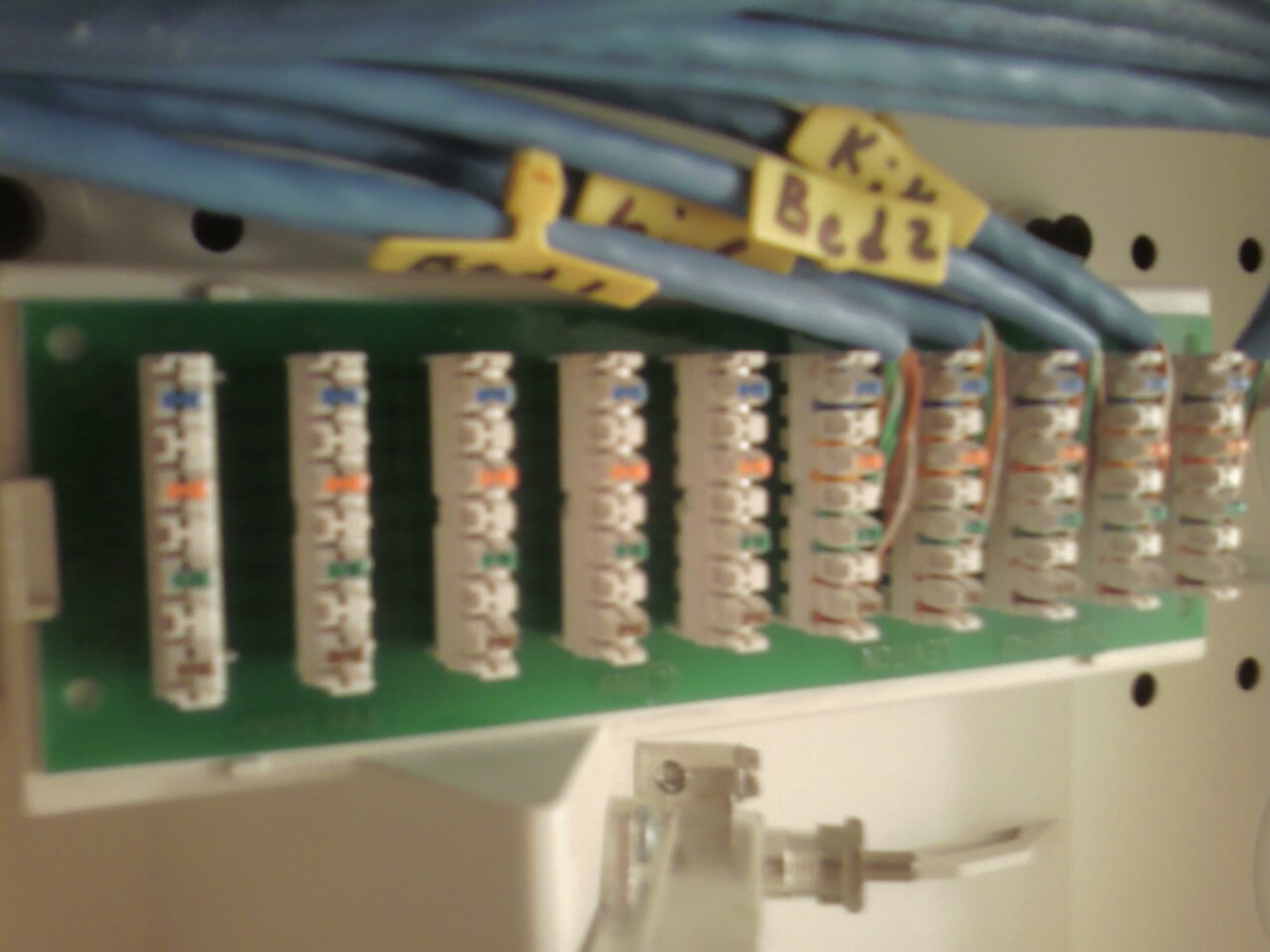
Attached is a photo of were the cabling box...
I see position 0 runs to a wire that goes outside my townhome in to the attached building, I want to just be able to run LAN stuff over the prewired stuff.
So do I yank the wires out of that splitter thing, put cable ends on them and plug them into my router? Or do I split a wire plug it into position 0 and can run data over it (I have a feeling this is not the case, as it just looks daisy chained).
-
My recommendation:
Patch Panel that accepts keystone jacks. Crimp keystone jack on end of every cable run. Run patch cords from panel to router/switch.
The cheap route would just be remove the jacks and crimp RJ45 ends on each cable and plug directly in to the router or switch.
-
my setup retains the bus block that you have, but like Nick says, the runs to each room terminate at a patch panel. For runs that should be data, i have a patch cable to the switch. For voice runs, i have a patch cable back to the bus-block.
I'd also change it so that the incoming line into the house doesn't go directly to the bus block. This way if you [or someone else] ever wants to run DSL, they put in one line-filter at the wiring panel and no filters are required anywhere in the house.
if you do the wiring right at both ends, you may be able to stack voice and data over the same cat5, but that limits how fast of a network you can run. you'd be better off doing voip in that case and running native data.
the reason to do the patch approach is so that you can flip everything back to "phone only" when you go to sell the place just by unplugging a few things.
I can snap a photo of my setup if you are interested.
-
I really only need two ports active, so I think it will be easiest for me to just yank the wires and crimp ends on two of them.
The coax cable setup in my place is a fucking nightmare, it's split like 4 times to each outlet making my cable modem fink out all the time. Going to try to eliminate some of those and maybe try an Motorola amplifer.
-
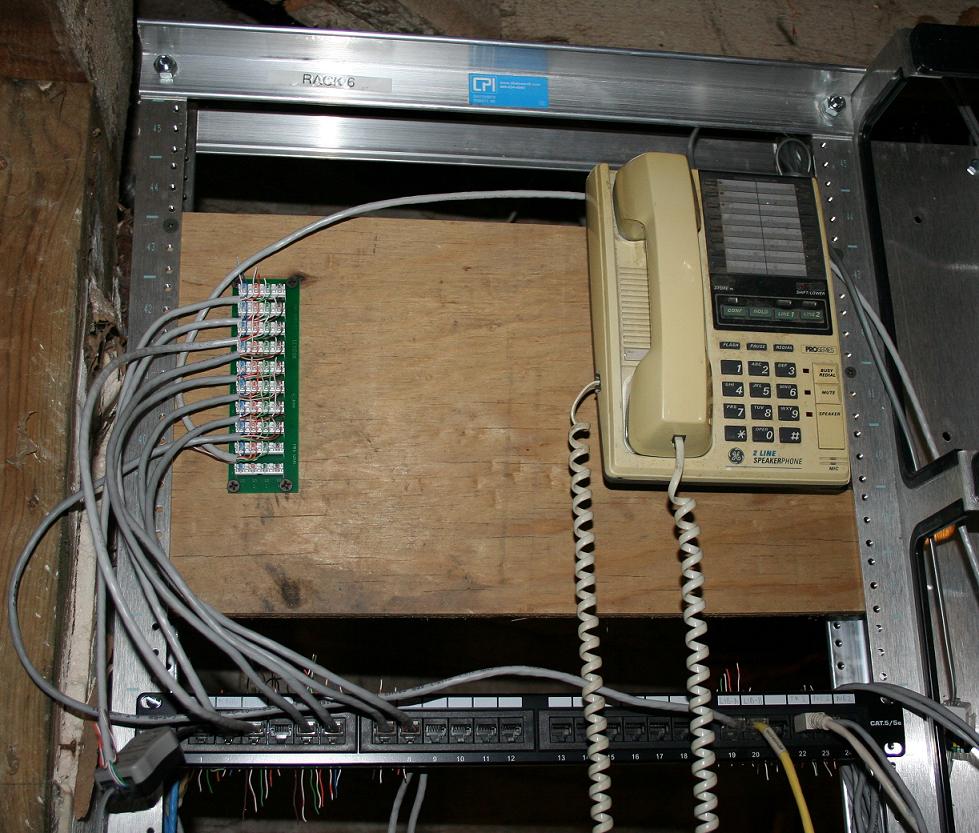
ok. Here's my setup in the basement. Standard 19" rack, with a 1U cat5 patch panel. Wires from "the house" go to the back of the patch panel. From there, i run cat5 patch cords to where they're supposed to go. Analog phones tend to be on the left side of the panel, data jacks are on the right. I have a lot of empty smurf tube in my house so only a few of the data-only ports are actually wired through right now.
The peice of plywood screwed into the top of the rack is what i mounted the bus-bar [what jim has] and a dorky old telephone to.
the bus bar is for voice phones in the house.
My main building entrance for phone is remoted over to port 1 on the black patch panel. Plugged into that is the only DSL splitter I have - one side goes to my DSL modem, the other goes to the short patch cable that goes to position 0 [the top most] on the bus block.
All [except 1] of the other short patch cables coming off the bus block go back to the patch panel and "create" the various phone jacks in the house.
The bottom most wire coming off of the bus block has a 6p6c/rj11 [i don't remember] female connector on it just to the right of the patch panel. The nasty 20 year old GE phone plugs into that. It's handy to have a test phone and a valid phone jack in your wiring closet [although mine is a "wiring basement"].
all of my actual network and server equipment is sitting on a table next to the rack because i am ghetto and have not converted over all of my stuff to rack-mountable yet. I run wired gig-E in the house, with active ports for my wife's office, my library, my theater room, and i don't remember where else. I only use wireless for devices that move, i.e. laptops.
If at some point, I want the phone jacks to be data [i.e. VOIP handsets inside the house], i just unplug the patch cables from the black panel to the bus block, and instead run a cable from that patch panel port over to a network switch. This also lets me convert one phone jack at a time, i.e. if i were running a hybrid POTS/VoIP system in the house [like asterisk PBX or something], some extensions could be old analog phones and some could be IP phones.
the patch panel i got off of newegg,the bus block at home depot. the RJ45 ends and jacks and wall plates and other stuff are all leviton and you can get them from home depot. The reason that none of the punched-down wire endss are cut is because i don't even have a real punchdown tool, i've been using the plastic one leviton includes with all of their stuff

-
Here is how my basement is set up:
Board Attached to Wall
Top:
(COAX)
DirecTV SWM-8 Multiswitch
DirecTV SWM Power Injector
8 Port Splitter for DirecTV Distribution(ETHERNET)
24 Port Keystone Jack Patch Panel
Each run of cat5 in the house is terminated with a keystone punch down end
2u Wire ManagementCisco 3550 POE 24 Port 10/100 Switch (I use POE to Power Access Point & Cisco Phones)
Cisco 2651XM Router
APC Netbotz Environmental Monitor (Monitors humidity/temperature in home with email alerts. I've also got an external fluid sensor attached to it located in the top of my sump pump hole. If the pump fails and the water rises I get an email notifying me of the problem.)Shelf that containts cable modem, Data Robotics Drobo and Data Robotics Droboshare. Droboshare is connected via gig copper to switch. This provides all storage in the house and currently houses two 1.5 tb drives configured in raid 1+0.
Lastly the bottom is just a 19" wide rackmount PDU that everything plugs in to.
I bought the rack, the pdu, the patch panel, the keystone ends, and the wire management from firefold.com.
I've also got a single run of coax that goes to the outside of the house to feed my cable modem, and a single run of unterminated cat5 that goes to the outside for phone service if I ever order it.

-
Raider;295100 wrote:
Nick what does that setup you have cost?With everything?
I suppose I have around $2500 or so into it. The storage was about $1000 alone, I have about $1250 into Cisco equipment, and probably $500 into everything else including the directv parts. I've had everything for about two years now so I don't really remember what the exact breakdown was.
-
thrash;295107 wrote:
getting that Cisco gear for $1250 must have involved a bit of ebay or a reach around to your cisco repdid you get that stuff to help do CCIE labs or was there some capability reason you used to justify the cost?
It's all used stuff so I just went through a used reseller I've used in the past. I put it in because I figure I might as well use what I preach, right? That and the last thing I want to do is fight with shit at home.
But as far as CCIE lab, no thats not it. I passed my CCIE Written Exam last March and this is what my lab looks like:


I'm hoping to pass the lab exam sometime during the summer of 2010. I have 18 months from last March to complete the lab portion.





Hello! It looks like you're interested in this conversation, but you don't have an account yet.
Getting fed up of having to scroll through the same posts each visit? When you register for an account, you'll always come back to exactly where you were before, and choose to be notified of new replies (either via email, or push notification). You'll also be able to save bookmarks and upvote posts to show your appreciation to other community members.
With your input, this post could be even better 💗
Register Login