12/29-1/3 Pimp my Ride! *Photoshop contest
-
Ok I want to start having a once a week photoshop contest. I will pick out a car and every one should do there best to pimp it out. At the end of the week I will add a metal to your sig if you win!
Good luck!
<u>RULES:</u>
**Take the car in the below image then pimp it in anyway you seem fit. on 1/3 I will make a poll thread and we can vote on the photoshops the car below. My photoshops are just for fun and will not be in the poll.Winner gets a metal for there sig.**

-
-
-
Damn Joe, what kind of photoshop program did you use? You should switch your major.
-
-
Image ready is fuckedup, i tried lassoing somethin and it wont let me cut
-
-
If you want you can use a pic of my car for the photoshop contest.
-
i used to be pretty good at PS.....havent dont it in so long though


R.I.P 1QK_PNY:icon_salut:
Current Ride-1983 Mustang GT T-top. 03 GSXR 750.
-
OK HERE ARE THE RULES!!!!!
I thought this was clear but I guess it was not. You have to take the car that I gave you in the first post and PIMP that car! The people who ( Other then me ) enter will be voted on in a thread then the winner will get a metal for there sig!Here is one I did for fun.
-Body Kit
-Rims
-Brakes
-Tint
-lowered
-Vinal
-Baby blue Paint
-Shaved door handles
-Clear lights
-
damn i gotta get this medal lol...gonna find a tutorial to PS again

R.I.P 1QK_PNY:icon_salut:
Current Ride-1983 Mustang GT T-top. 03 GSXR 750.
-
Bryce do you have a list of Adobe Photoshop 8 w/ ImagreReady CS serial codes. I found one, and now its expired so im gonna just reinstall it, and enter a different code. Got any layin around the office?
-
-
STiSchucky wrote:
Bryce do you have a list of Adobe Photoshop 8 w/ ImagreReady CS serial codes. I found one, and now its expired so im gonna just reinstall it, and enter a different code. Got any layin around the office?
Sorry I'm a Mac user, so all my codes are for Mac copys.At work I use legit copys of everything so once again I can't help you. Hop on Kazaa and search for a serial code for Photoshop CS and you should get one right away.
Come on Joe take a stab at the yellow car, just add your evo wing and tales.
-
lowering?...how do ya do it. I remember you have to lasso the bottom of the car up (above the wheels) and copy and paste then press down on the arrown but thats not working
R.I.P 1QK_PNY:icon_salut:
Current Ride-1983 Mustang GT T-top. 03 GSXR 750.
-
and would the ellipse tool be called something else..cause i cant find it to swap rims
R.I.P 1QK_PNY:icon_salut:
Current Ride-1983 Mustang GT T-top. 03 GSXR 750.
-
What I would do is take the Polygonal Lasso tool and cut the body of the car from the picture. Then delete the background and keep your body one its own layer and play with it.
Then just toss some cut out rims on the jmage below, and lower the body if you show choose.
-
ok i'll try that
R.I.P 1QK_PNY:icon_salut:
Current Ride-1983 Mustang GT T-top. 03 GSXR 750.
-
<u>OK you just broke the tables, please make get rid of that image or re-size it!</u>
Ok you need to click and hold down on the lasso tool or for the paint bucket you need to click and hold on the gradiant tool. There are more tool's hidden under alike tools.
Just click then hold, click and hold.
-
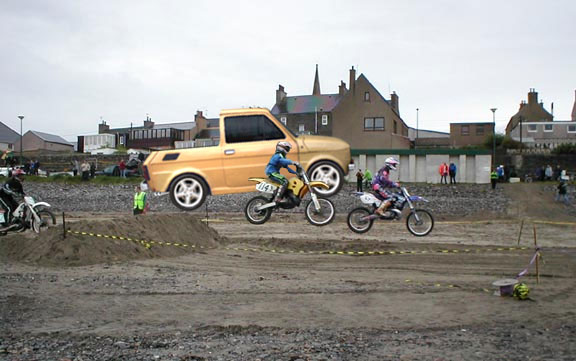
Here's my submission





Hello! It looks like you're interested in this conversation, but you don't have an account yet.
Getting fed up of having to scroll through the same posts each visit? When you register for an account, you'll always come back to exactly where you were before, and choose to be notified of new replies (either via email, or push notification). You'll also be able to save bookmarks and upvote posts to show your appreciation to other community members.
With your input, this post could be even better 💗
Register Login